




Overview
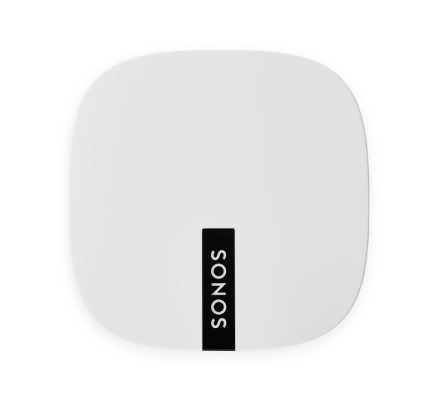
For when existing WiFi isn’t reliable enough for streaming music—
- Boost broadcasts 360° signals through walls and ceilings for flawless coverage.
- Streams without interference in the most challenging WiFi environments.
- Bypasses your WiFi to create a separate high-performance wireless network just for Sonos speakers.
- Works with either Sonos S2 or Sonos S1 (for Android and iOS).
When to use a Boost
- Your WiFi is slow or temperamental, or your network is already in high demand with streaming video, gaming, and internet usage.
- WiFi doesn’t reach all the rooms where you want to use Sonos. Extend the range of your Sonos system by placing a Boost in between the Sonos speaker that’s out of reach and the rest of the Sonos system.
- Your network is 5 GHz only (not switchable to 2.4 GHz).
- Your router supports only 802.11n (you can’t change the settings to support 802.11b/g/n).
Note: Portable Sonos products cannot connect to the dedicated wireless network created by Boost.
Controls and lights
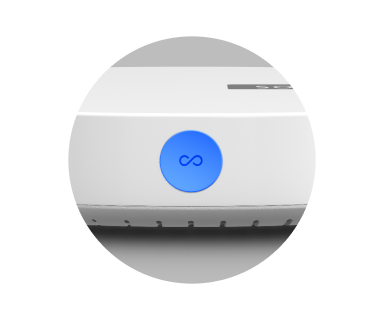 |
Join button |
Press to connect during setup. |
|
|
Status light |
Indicates the status. Learn more Note: If the light is distracting, you can turn it off in your room’s settings. |
Connector panel
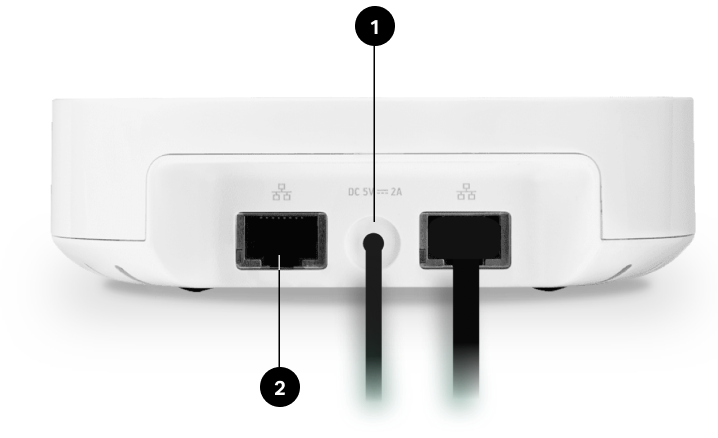
|
1
|
AC power (Mains) input |
Use only the supplied power cord (using a third-party power cord will void your warranty). |
|
2
|
Ethernet ports |
Use an Ethernet cable to connect to a router, computer, or additional network device like a network-attached storage (NAS) device (optional). |
Select a location
If you purchased a Boost to replace a Sonos product that’s connected to your router, first add Boost to your Sonos system, then plug it into your router and move the one that was originally wired.
If you purchased a Boost to extend the range of your Sonos system, place Boost in between the Sonos speaker that’s out of reach and the rest of the Sonos system.
Wall mount
|
1
|
Choose a location that’s close to an electrical outlet (power cord length is 6 ft. / 1.8m), away from heat sources, hidden wiring, gas lines, etc. |
|
|
2
|
Drive an American standard #6 round head screw (metric, M3.5 round head screw) into the wall, leaving a gap between the wall and the screw head (approximately 0.13 in / 3.3mm). Note: Pan head screws will also work. |
|
|
3
|
Place Boost on the wall and slide straight down, allowing the screw head to slip behind the smaller end of the keyhole slot on the back of Boost. |
|
Specifications
| Feature | Description |
|---|---|
|
Ethernet ports |
2-port switch, 10/100 Mbps, auto MDI/MDIX |
|
Network bridging |
2-port switch allows a connection to your network or to other Sonos speakers Extend the range of SonosNet—use a Boost to extend the SonosNet signal to areas that cannot reach the rest of the Sonos system |
|
Wireless connectivity |
Works on SonosNet™, a secure AES encrypted, peer-to-peer wireless mesh network dedicated exclusively for Sonos to reduce WiFi interference |
|
Power supply |
Auto-switching 100 - 240 V ~ 50-60 Hz 0.3 A AC universal input |
|
Dimensions (H x W x D) |
1.3 x 4.5 x 4.5in (33 x 115 x 115mm) |
|
Weight |
.42lb. (.191kg) |
|
Operating temperature |
32°F to 104° F (0° C to 40° C) |
|
Recommended mounting screw |
American standard #6 round head screw, Metric M3.5 round head screw |
|
Finish |
White/high quality polycarbonate material |
|
Package contents |
Sonos Boost, power cord, Ethernet cable, and Quickstart Guide. |